
AI-native customer support
Where support endsand engineering begins , nowhere.
The report comes in. The fix goes out. The customer gets told.
One platform for the people who answer and the people who fix. It works the queue, investigates bugs against your own code, and hands your engineer a change to approve.
14 days free on the Growth plan. No card, no call, and nothing to uninstall if you walk away.
Queue6 items
AllConversationsTickets
- Sarah K.2mLogin page shows blank white screen on my iPh…WidgetOpen
- TCK-479 Acme Corp15mRate limit counter not resetting at midnight UTC…Investigating⚡ Caught · Sentry
- Tom W.1hHow do I export all my contacts as a CSV?Email
WidgetOpen
Login page blank on mobile Safari
Sarah K. · Acme Corp · Widget
SKHi, getting a blank white screen when logging in on my iPhone. Safari 17, iOS 17. Was working fine yesterday.Sarah K. · 10:42 AM
Write a reply…
Details
- Customer
- Sarah K.
- Company
- Acme Corp
- Channel
- Widget
- Assignee
- Mark T.
- Status
- Open
We run our own products on it
Codas Labs builds all five of these, and their support runs through Tore. They are our products rather than independent customers, which is exactly why we can say what it is like to live with.

 MeshTale


Teams outside Codas Labs
Added as beta customers come on board. We would rather show an empty shelf than someone else’s logo.
What the AI actually does
Six jobs, and you can watch each one
Not a chatbot bolted to a help desk. Pick a tab and the thing plays: the answer with its citation, the bug arriving with its evidence, the investigation reading your code, the fix waiting for a person.
It answers, and it shows its working
The AI replies from your own help center and cites the article it used, so the customer can check it and your team can see where the answer came from. When it is not confident, it hands over rather than guessing.
- Search understands meaning rather than matching keywords, so a customer asking why they cannot log in finds the password article
- Every AI answer cites the article it came from, so a customer can check it
- Live updates, so two people never answer the same thing twice
- It hands over to a person rather than guessing when it is not confident
The proactive half
Most of it starts before anyone writes in
Connect your error tracker and Tore opens an investigation the moment something breaks, so the fix is often shipped before the first customer notices.


 500
50009:14
Error first seen
3 users affected
 api/checkout/route.ts
09:14
Investigation opened
no human involved
- +1 -0
09:21
Fix proposed
sent for approval
v2.4.2→


09:40
Shipped
approved, shipped, and the reporters told
The ticket nobody filed
“Hi, checkout seems to be broken?”
How it works
Five steps, and the fifth one starts the first again
These are real screens from Tore's own demo, not drawings of a product that does not exist yet. Follow the line down.
01
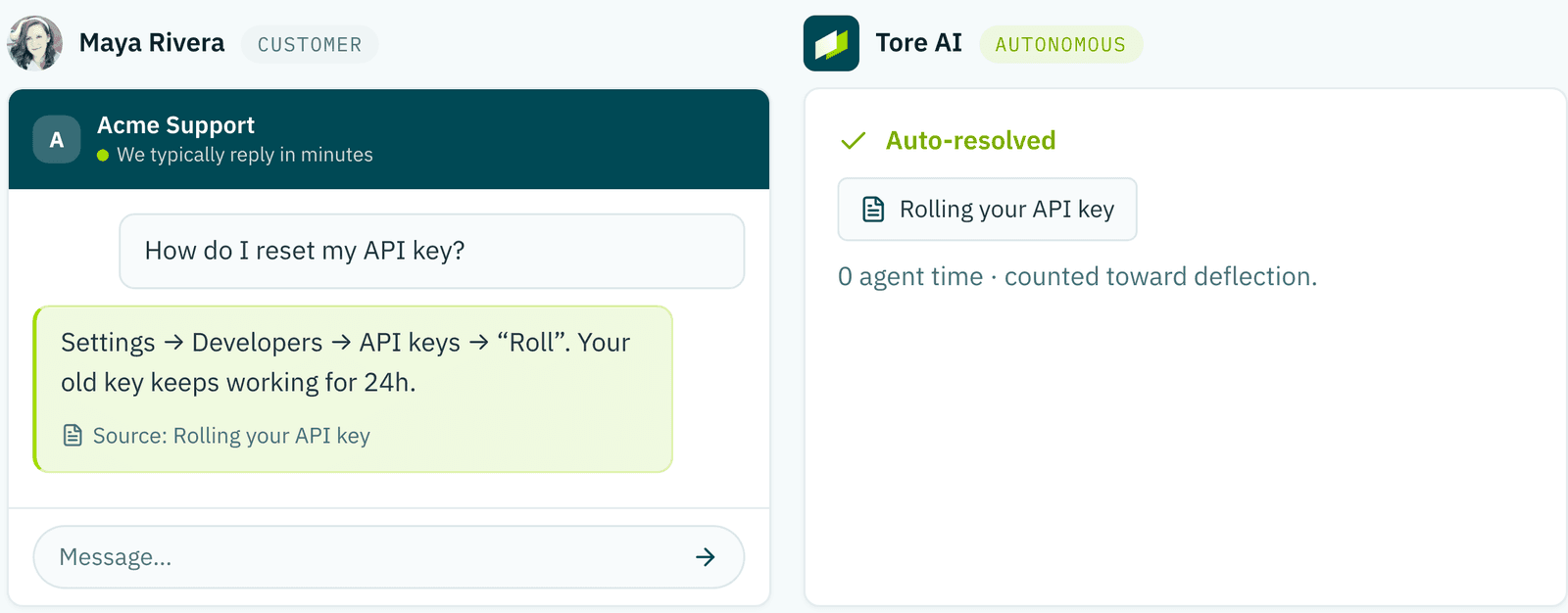
Answered before it becomes a ticket
A question with an answer already in your help center never becomes a ticket. The reply cites the article it came from, so your customer can check it.
0 agent time
02
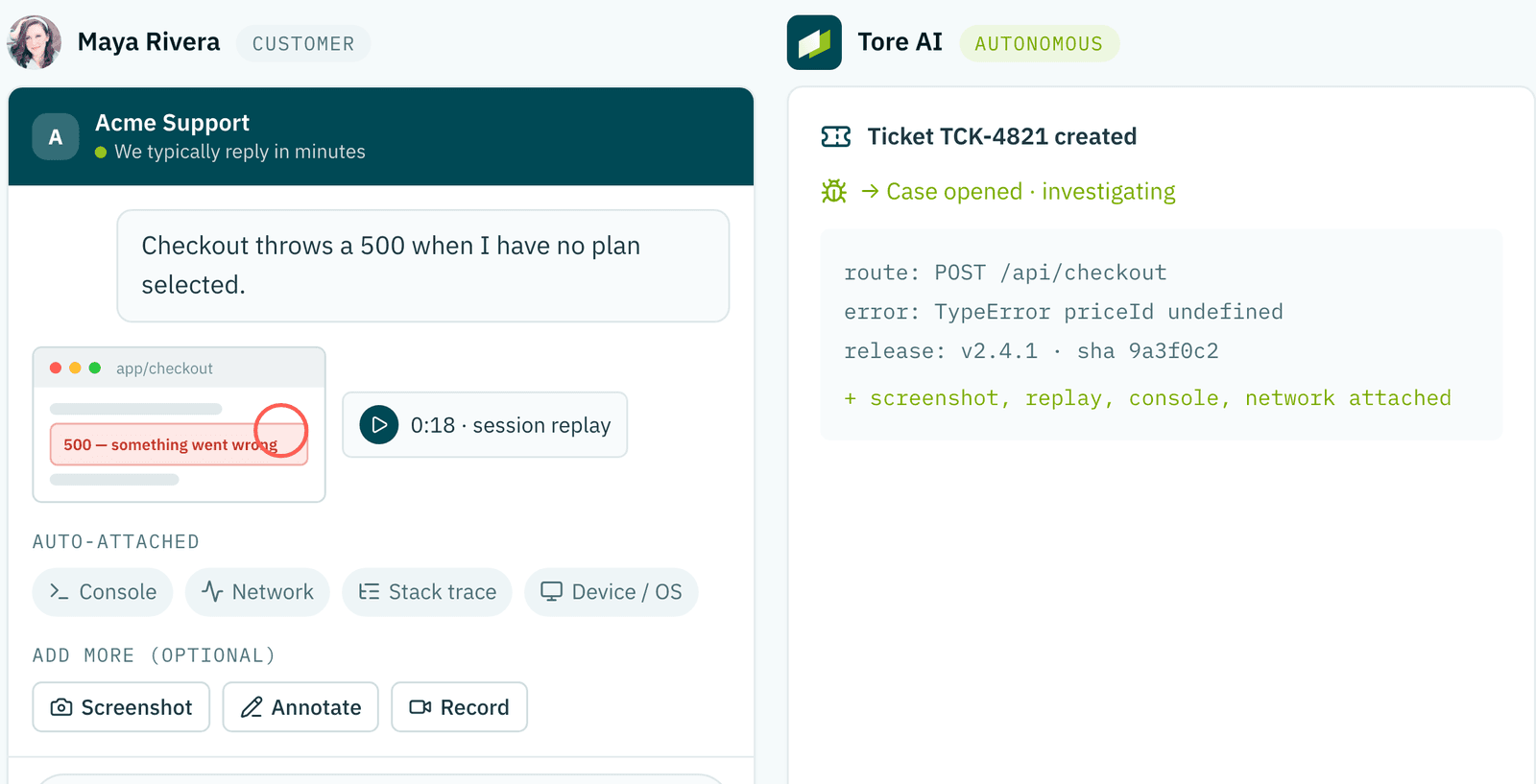
The whole story, attached
When it is a real bug, the report arrives with the screen recording, the console output and the network trail already attached. Nobody has to ask what browser they were on.
replay · console · network · release
03
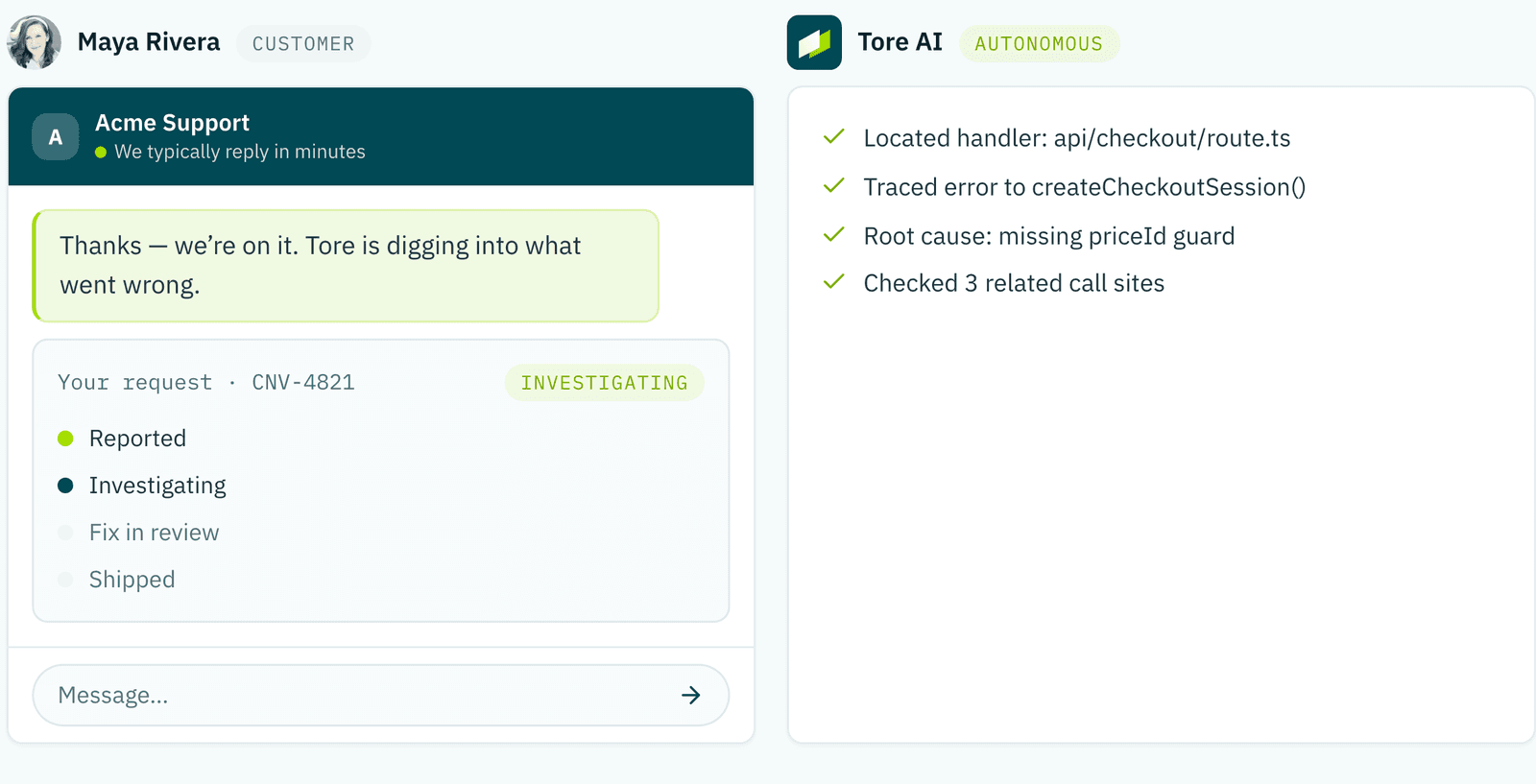
It reads the actual code
The stack trace, the commit that touched those lines, the files around it. Not a guess from the ticket text, the real frame, from your repository.
stack frame · blame · call sites
04
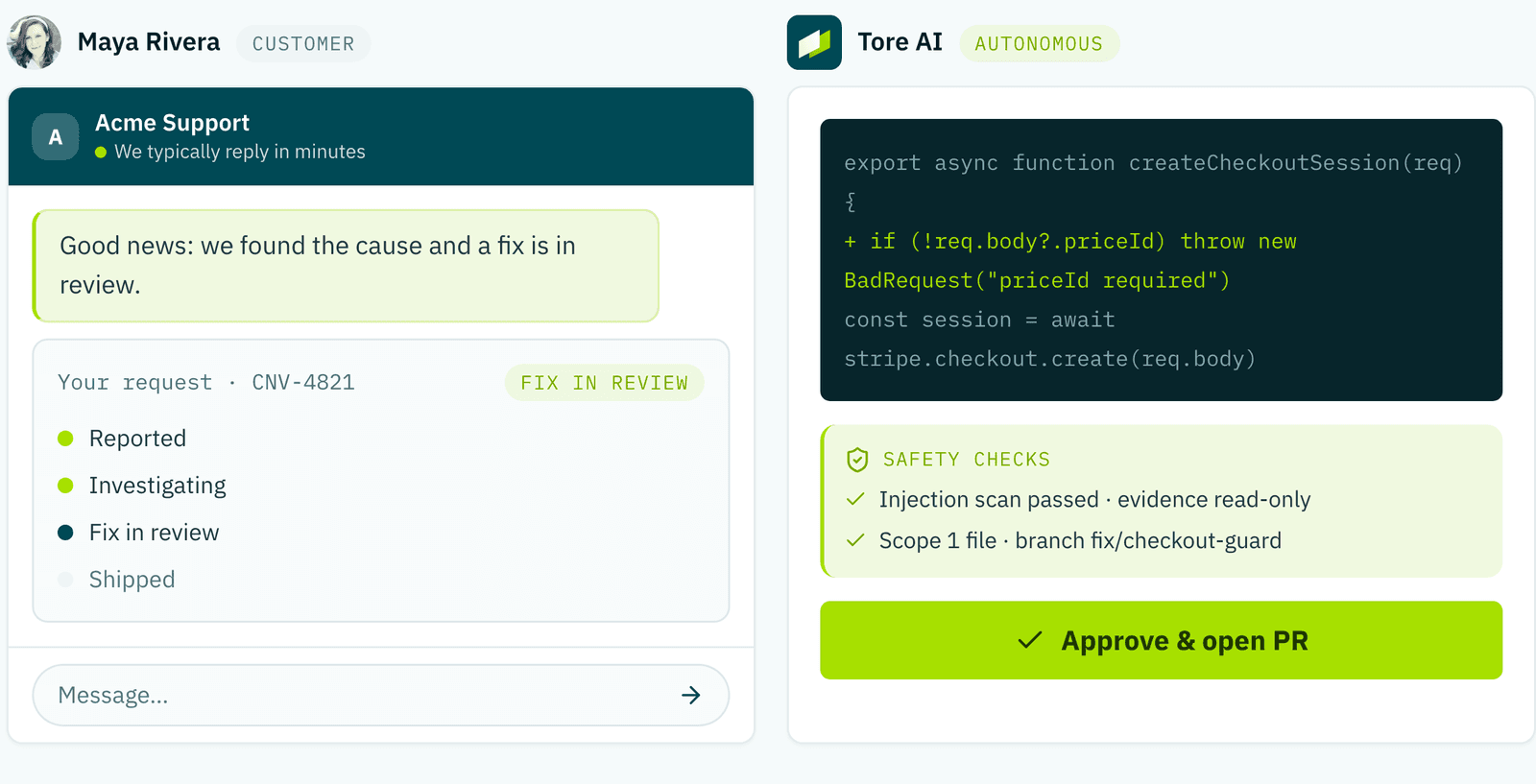
A change, and the working behind it
A diff, the safety checks it ran, and the single file it wants to touch. Your engineer approves or rejects. Anything near authentication, billing or the database escalates instead of proposing.
1 file · safety checks · your approval
05
And they hear back
When the fix ships, the conversation they started updates itself. Drafted automatically, sent once a human approves the wording. This is the half almost nobody else closes.
drafted · human-approved · sent
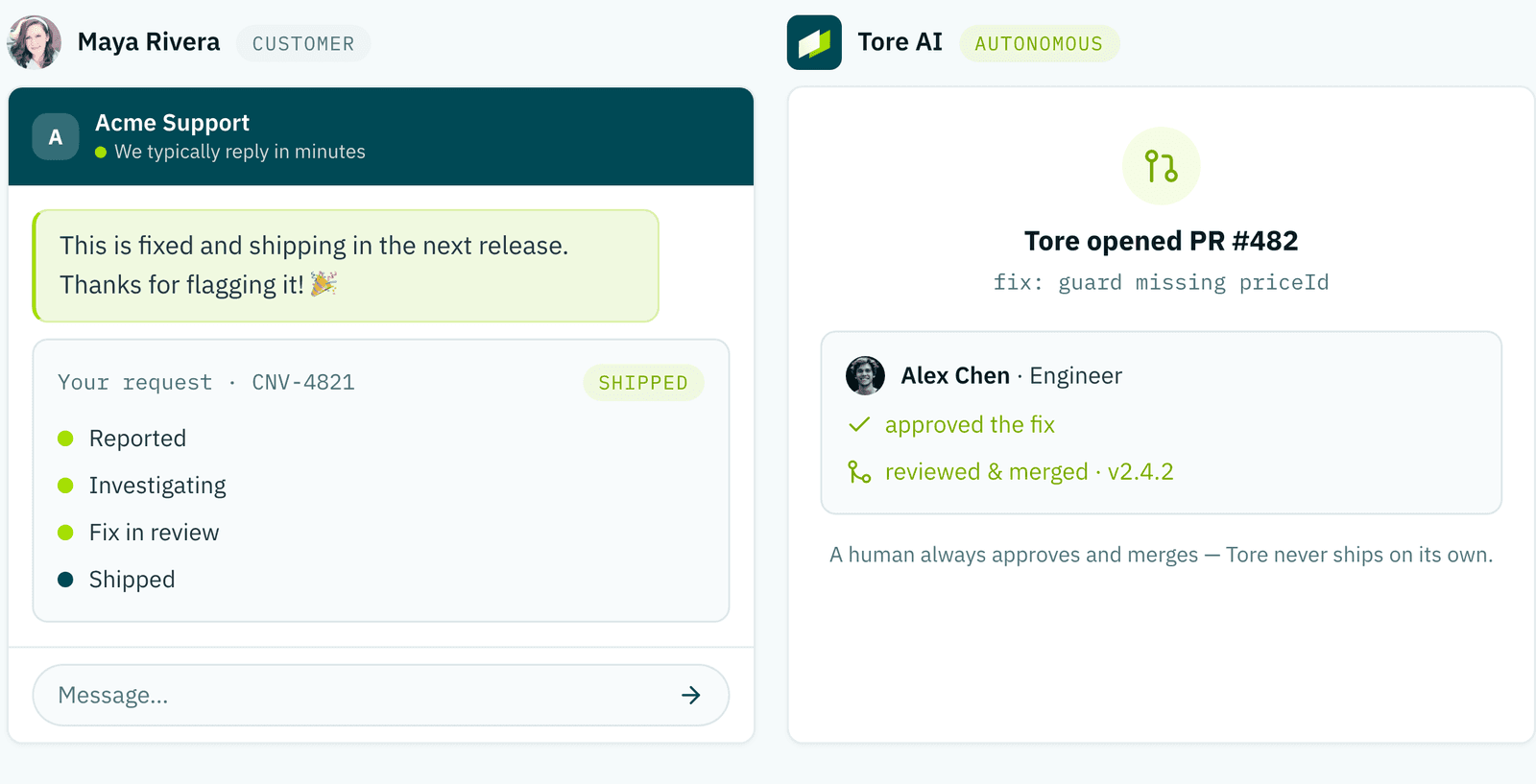
And then it closes
The tool that took the report is the tool that shipped the fix
So the person who reported it hears back without anyone remembering to tell them. That return path is the half almost nobody else closes.
Report
Checkout throws a 500 when I have no plan selected
- A customer hits a bug
- Tore captures the context
- It investigates your code
- It proposes a fix
- The fix ships
and they get told it shipped
The whole loop, without you
It reads the errors, reads your code, and prepares the fix
Your error stream is the trigger. Tore groups the noise, opens an investigation on its own, reads the repository as it is right now, and prepares one reviewable change, then stops and waits for your engineer.
Feeding inSentryRollbarBugsnagDatadog
Error stream · production
- 10:41:58 POST /api/checkout 500
- 10:41:59 TypeError: priceId undefined
- 10:42:03 POST /api/checkout 500
- 10:42:07 POST /api/checkout 500
- 10:42:11 TypeError: priceId undefined
Reading your repository
- app/(main)/checkout/page.tsx
- api/checkout/route.ts
- api/checkout/session.ts
- lib/stripe/client.ts
Proposed change
Waiting for the investigation to find the frame…
Won’t it go berserk?
One bad deploy is one investigation
Errors group by fingerprint before anything acts on them, and thresholds decide what is worth picking up. You set budgets, an ignore list, and a kill switch.
One fingerprint
One investigation
TypeError: priceId undefined
0identical errors from one bad deploy, grouped, counted, and handled as one.
No more “what were you doing?”
The bug report writes itself
Your customer clicks the thing that is broken. Everything an engineer would have asked for in the next four replies is already attached, and the secrets are stripped out before any of it leaves their browser.
How bug capture worksAttached to the reportNothing typed by them
- The element they clickedbutton#checkout-submit
Did it actually help?
Every resolution is attributed, so you can tell
An AI that closes conversations is easy. An AI that closes them and leaves customers happier is the only version worth paying for, and the only way to know which one you have is to measure the two separately.
Who resolved itExport
- AI resolved0%
- AI assisted0%
- Person0%
- Self-serve0%
- Every conversation closes as AI resolved, AI assisted, resolved by a person, self-served or auto closed. Not a guess, a recorded attribution.
- Satisfaction is attached to whoever resolved it, so an AI score and a human score are two different numbers you can compare.
- First response and resolution times, per agent and for the AI, over any period you choose.
- All of it exports, because at some point somebody will want it in a spreadsheet.
Not built yet: Every conversation is scored against your own standards, continuously.
Not built yet: Build your own reports, with your own filters and charts.
How accounts work
One login. Many products. Many clients.
Most support tools assume you are one company supporting one product. Tore does not. You can run several products from one organization, and an agency can hold many client organizations under a single account, with nothing crossing between them.
Your accountone login, one billLevel 1
Northwindyour own companyown domain · own portal
HalyardFoghornKestrel+ product
If you are an agency, this is the part nobody else builds for. Your team sees the clients they work on, each client sees only themselves, and you bill once.
The layer in front
Built to keep the work off your team
Support, the bug, the cause, the fix and the follow-up, handled by one system rather than five tools that do not talk to each other.
Triages and routes what comes in
Rules, assignment and tagging across every channel you connect.
Captures the bug properly
Screen recording, console and network trail, from inside your app.
Investigates against your real codePulls the stack trace, the commit history and the surrounding files.
Proposes the fix, with its evidenceA reviewable packet, not a black box. Risky areas escalate instead.
Tells the reporter when it shipsDrafted for you, sent only once a human approves the wording.
Answers the repeat questionsReplies from your help center, in the widget, before anyone is paged.
Writes the article that stops it recurringSpots the gap, drafts it, waits for approval before publishing.
Opens the pull requestThe branch and the change, on your repo, for your engineer to merge.
Their side of it
Your customer can see where their request got to
The whole rest of this page is what your team sees. This is what the person who wrote in sees, on your domain, with your branding, without emailing anyone to ask for an update.
support.northwind.example
NNorthwind SupportHelp centerYour requestsRoadmap
Your requests
Checkout throws a 500 when I have no plan selected
TCK-482 · bug · reported 09:14
- Received
- Triaged
- Being worked on
- Fixed and released
Powered by on their domain, with their branding
The half that answers before you do
Most of it never reaches your queue
A help center the AI answers from and cites, a portal where customers watch their own request move, boards where they vote instead of emailing, and a changelog that tells them when it shipped. Every one of these is a conversation you never had to have.
Help center
Articles, imported documents and PDFs, searched by meaning rather than keywords. The same source the AI cites when it answers.
Help center, in fullFig 1 · Help centerAcmeHomeGuidesAskwhy can’t I log in after changing my email?AIAnswered from your help centerChanging your email signs out other sessions. Sign in with the new address, or reset if the link expired.citedResetting your passwordWas this helpful?YesNoTalk to a person
Customer portal
Your customers see their own requests, and where each one has got to, on your domain.
Customer portal, in fullFig 2 · Customer portalAcmeRequestsRoadmapUpdatesYour requests3 openCheckout fails on Safariin progressReported by you
 Export as CSVplannedDark modeshipped
Export as CSVplannedDark modeshippedFeature requests
Boards with voting, and duplicates merged rather than counted twice.
Fig 3 · RequestsAcmeBoardMine41Bulk export 2d+3“CSV download” merged in18Slack notificationsFeature requests, in full
Product roadmap
What you are working on, public or private, per product.
Fig 4 · RoadmapAcmeNowPublicNowNextLaterProduct roadmap, in fullChangelog
What shipped, and the people who asked for it told.
Fig 5 · ChangelogAcmeLatestAllv2.4.2Checkout fixSelecting no plan no longer throws on checkout.3 people who asked were told Changelog, in full
Status page
One page to point at when something is broken.
Fig 6 · StatusAcmeStatusHistoryAPIoperationalWidgetoperationalWebhooksdegradedDashboardoperationalStatus page, in fullAPI and webhooks
Scoped keys and signed webhooks, so you can build the part we did not.
Fig 7 · APIAcmeKeysWebhooksLogssk_live_••••4f2areadwriteticket.createdsigned · 200fix.proposedsigned · 200API and webhooks, in fullConnections
It plugs into the stack you already run
Tore connects to things for one reason: so a conversation, an error and the code that caused it are the same story rather than three. The connections page lists every one, and says where each stands.
Errorsthe errors
Sentry
Rollbar
Bugsnag
Datadog
Code and deploysthe code
GitLab
Bitbucket
Azure DevOps
Vercel
CircleCI
Chat and emailthe team
Slack
Email
Discord
Microsoft Teams
Issues and trackingthe issues
Linear
Jira
ClickUp
Asana
Analytics, CRM and automationthe context
PostHog
Segment
Amplitude
HubSpot
Salesforce
Attio
Zapier
Make
n8n
Intercom
Zendesk
Front
Tore
One thread, one
audit trail
And back out: a reviewed change, and the customer who reported it told that it shipped.
Every connection, and where each one stands
30 in the catalog
What teams say
This is where the quotes go
Empty on purpose. The first quotes here will be from real beta customers, named, and about something that actually happened.
Case studies
The first ones are being written now
With real numbers from real beta customers, and the method stated so you can judge them. Not before.
Get going
Start on the full plan, free for 14 days
Every workspace starts on Growth with everything switched on. No card, no call. At the end you pick a plan or drop to Free, nothing is deleted either way.
14 days free · no card · full Growth plan